Ninja Attack Animation WIP
This personal project allowed me to dive into game animation. In Unreal, I learned how to create a state machine to seamlessly transition among various animation states in response to user interaction. I had created state machine diagrams in a slightly different context for my Subsystem Design course, so this application was very exciting! I also brushed up on my workflow for exporting rigs and animations between Maya and Unreal. Regarding the animation, I had to adjust my film mindset to be aware of the animation from more than one angle. I also kept the motion limited, resisting the urge to add lots of anticipation and exaggeration.
This is currently a WIP as I would like to add a run cycle and jump, so any and all feedback is greatly appreciated.
Rig: Animation Buffet
Character animation for mock gameplay. Reacts to user input (Q = walk, V = attack, default is idle),

The Event Graph for the Level Blueprint. I made this to allow user input to dictate the character's movements.
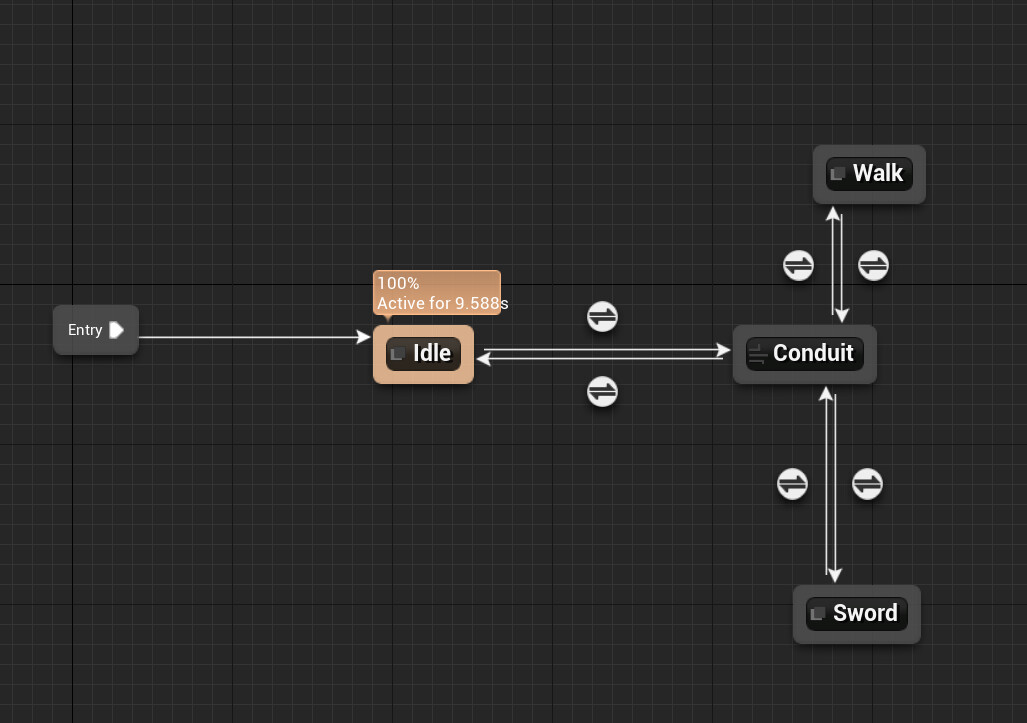
My first lil state machine (isn't she cute). This make the default animation an idle with the ability to switch to a walk or attack.

At the top, there are the three enums I used to easily switch between states. Below is the check to ensure the state has changed via the enums before the rig can switch animations.